
Tracking and controlling the bundle size of an application can be a tough task. Even the smallest pull request can result in a bloated bundle. If you ever worked on optimizing your initial bundle size, you must know that maintaining a lightweight bundle can be a challenge. Luckily there are tools on the market that can help protect the application bundle from bloating.
If you’re interested in optimizing your application bundle, check my previous article – How to Optimize Your Angular Bundle Size. It covers fundamental knowledge about bundle size, bundle-analyzer tools, and optimization techniques.
Why You Should Track Bundle Size
Tracking bundle size can prevent its bloating which would result in slow loading times for application. You may already know that optimizing application bundles is a hard and long-lasting process of introducing small improvements. Because of that, it is better to regularly monitor the bundle size – this prevents situations in which we discover a problem after a month and only then carry out optimization.
Did you know that importing a single small feature from an internal library can result in introducing huge amounts of unnecessary code to your application bundle? Such things are common and often related to tree-shaking not working as expected. You probably think that it’s easy to fix, simply remove the import from your codebase and you’re right, but… investigating which import results in bundle-bloat can take a long time, especially if you don’t know which commit resulted in bundle-bloat.
Taking the above things into consideration you should consider setting up a bundle-size check in your project sooner than later – it’ll save you optimization efforts in the long run. I promise you’ll thank yourself later.
BundleMon – CI Tool You Need
As we know why it’s worth setting up a bundle-size check, let’s look into the example bundle monitoring tool. BundleMon is a tool that helps you to monitor your bundle size on every commit and alerts you on drastic (often unintentional) bundle size changes.
BundleMon offers you all you could ever need in terms of monitoring your bundle size:
– PR checks with the percentage change in bundle size,
– PR comments with updated files in the bundle,
– setting bundle size limits for individual files,
– interactive chart showcasing branch bundle size history.
Exploring the BundleMon Features
Let’s take a look in-depth into each feature of BundleMon
Pull Request Checks
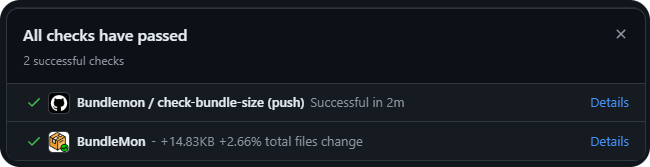
They can block merging the PR based on a percentage of the total change in files. It’s useful if we want to make sure that no one unauthorized will merge a bloating PR to the main branch that contains production code.
As you can see below PR checks contain differences in size between the PR branch and your main branch. In this case, it’s 14.83KB, which would make a 2.66% total bundle size increase after merging.
Pull Request Comments
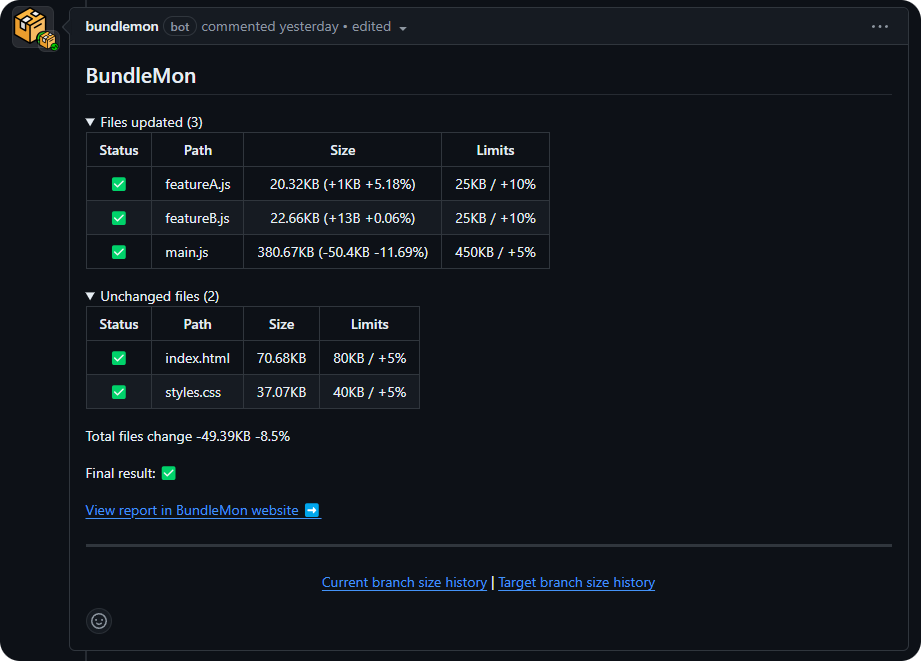
Another great feature of BundleMon is the PR comments. They provide you with in-depth information about what has changed in the end-bundle of your application. You can easily see what files have been added, updated, and removed from your bundle size.
As you can see below, comments contain information about the size change to particular files that are next to the file size limit. At the bottom of each comment, you’ll find information about total files change in KB and %.
Bundle Size Charts
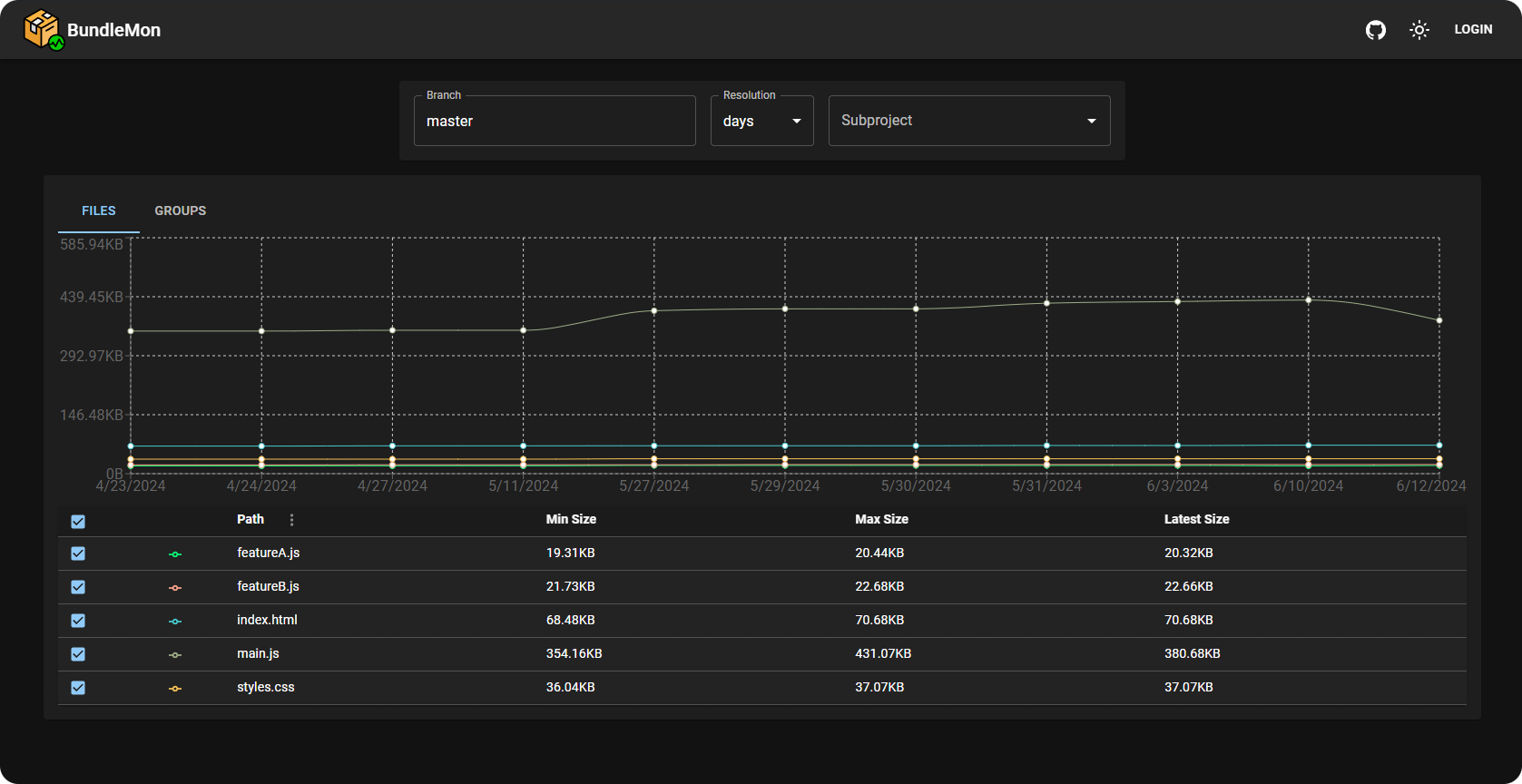
A significant feature that distinguishes BundleMon from other libraries on the market is the chart feature. After clicking on the Current branch size history or Target branch size history link in the PR comment you’ll be redirected to the chart page on the BundleMon site.
From there you can easily see how bundles of particular files changed over time, see the date of commits that impacted bundle size. Such information is invaluable, especially if you’re working on optimizing your bundle.
Here’s an example link to the bundle size chart of NGXS – angular state management library.
Adding BundleMon to Project
The process of adding BundleMon to your project will differ based on what CI platform you use. If you use GitHub Actions follow this guide and in case you’re using CodeFresh use this guide. Once you set up the action on the CI you can add BundleMon configuration to your project repository.
BundleMon Config File
Let’s discuss the config properties that you can see in the BundleMon config file:
- baseDir – this is the folder where BundleMon should look for output files. Adjust it to reflect your project’s build output.
- defaultCompression – defines the compression that should be used while calculating file size. You can choose between “none”, “gzip”, or “brotli”. In my case, it’s set to “none” as I want to see the raw file size.
- files – this section contains the configuration for files that you want to track on CI. Each file configuration includes the “file path”, “maximum size”, and “maximum percent increase” per pull request. You may also configure a friendly name and use regex pattern matching for files depending on your needs. See the documentation for more details.
- reportOutput – configuration for the BundleMon features. Here, you can toggle check runs, commit status and pr comments.
.bundlemonrc.json
{
 "baseDir": "./dist/your-application-name/browser",
 "defaultCompression": "none",
 "files": [
  {
   "path": "index.html",
   "maxSize": "80kb",
   "maxPercentIncrease": 5
  },
  {
   "path": "main.js",
   "maxSize": "450kb",
   "maxPercentIncrease": 5
  },
  {
   "path": "styles.css",
   "maxSize": "40kb",
   "maxPercentIncrease": 5
  },
  {
   "path": "feature-a.js",
   "maxSize": "25kb",
   "maxPercentIncrease": 10
  },
  {
   "path": "feature-b.js",
   "maxSize": "25kb",
   "maxPercentIncrease": 10
  }
 ],
 "reportOutput": [
  [
   "github",
   {
    "checkRun": true,
    "commitStatus": true,
    "prComment": true
   }
  ]
 ]
}
GitHub Action File
To tailor the GitHub Action file for an Angular project, you only need to make a few adjustments compared to the file from docs. Replace the yarn build script from the documentation with the Angular build command including extra flags that I discussed in my previous article.
bundlemon.yml
name: Bundlemon


on:
 push:
   branches: [master]
 pull_request:
   types: [synchronize, opened, reopened]


permissions: write-all


jobs:
 check-bundle-size:
   runs-on: ubuntu-latest
   steps:
     - uses: actions/checkout@v2
     - name: Use Node.js 20
       uses: actions/setup-node@v2-beta
       with:
         node-version: '20.11.1'


     - name: Install dependencies
       run: npm ci


     - name: Build
       run: npx ng build --named-chunks=true --output-hashing=none --source-map=true


     - name: BundleMon
       uses: lironer/bundlemon-action@v1
Potential Limitations
It’s also important to notice that by default BundleMon is running on a free hosted server set up by the author of the library. Because of that BundleMon that has some limitations:
– records created by a PR will be deleted after 30 days,
– records in branches without activity (new commits) will be deleted after 180 days,
– after 90 days only the latest record per day will be kept.
Keep in mind that the above limits may change in the future. The good news is that the author of BundleMon allows you to run BundleMon on your server – so you can enjoy the tool to the last bit.
Conclusion
As you can see monitoring bundle size can easily prevent a bundle size bloat and potential development work on optimization efforts in the long run. Remember that BundleMon is just one of many bundle-size monitoring solutions. You may also check out bundlesize, bundlewatch or size-limit. They’re great but aren’t as rich-featured as BundleMon. Also, don’t forget about configuring bundle-size budgets for your application in angular.json.