
The world of software development is changing faster than ever. Artificial Intelligence is no longer just a trend. It’s already part of the way we build software. In this guide, I’ll share my own experience working with AI agents and give you practical advice on using them in Angular projects. You’ll learn the difference between Vibe Coding and AI-Assisted Coding, and how to guide an AI agent to act like an additional team member, writing code that follows your rules, stays predictable, and is easy to review.
What Exactly Is an AI Agent?
By definition, an AI agent is a software system that performs tasks and makes decisions autonomously based on defined rules.
AI agents demonstrate capabilities such as reasoning, planning, learning, and adaptation. They can operate with minimal human intervention, interact with the development environment, and utilize tools to carry out complex, multi-step processes.
Popular Ai agents:
- GPT codex
- Claude code
- Github copilot
- Cursor
- Windsurf
- Kiro
Some agents “live” in your browser, some in your CLI, and others require a dedicated IDE (Cursor, Windsurf, Kiro) or integrate directly into your existing editor. Each approach comes with its own pros and cons. We’ll go through them in this article.
Why Should You Use One?
A great deal of work can be automated, letting devs focus on more complex tasks. Well guided AI agents can deliver consistent, high-quality code that follows best practices and is easier to maintain. They can take over the repetitive, tedious tasks. Think of AI agents as extra developers on your team—just like human teammates. There is one catch: they need proper onboarding to work effectively.
Vibe Coding vs. AI-Assisted Coding
Vibe Coding is when you let the AI generate code freely, without much guidance. It can be fast for scaffolding or quick experiments, but the results often come with serious downsides: inefficient architecture, poor scalability, low security, and a big amount of code to review that’s hard to understand or maintain. That’s why vibe coding is risky for enterprise-grade applications.
Vibe coding is like having a junior developer who worked extra hours all weekend and then asks you to review everything at once on Monday.
AI-Assisted Coding, on the other hand, treats the AI agent like another developer on the team. After proper onboarding, the agent follows your rules, naming conventions, architectural patterns, and coding standards. Every change is predictable, scoped, and testable. The output is smaller and easier to review and integrate into an existing codebase.
In this article, we’ll focus entirely on AI-Assisted Coding. That’s the approach that can deliver real value in professional Angular projects.
Guide your Agent for effective AI assistance
The hard truth is that AI agents will only work for you if you create the right environment. I tested this extensively on a side project, trying to get the most out of an agentic workflow. To make it manageable, I chose nx monorepo with a full-stack project in a single language (TypeScript) for both backend and frontend.
One repo means one prompt, which equals one shared mental model for both the human and the AI agent. Here’s why it works so well:
- One prompt affects the whole system: no need to repeat instructions for different repositories.
- Reduces prompt complexity: no tailoring for multiple languages or services.
- Promotes consistency: patterns, naming conventions, and architecture are easier for the agent to follow.
Help Your Agent To Understand Your Data Model and Reason About It
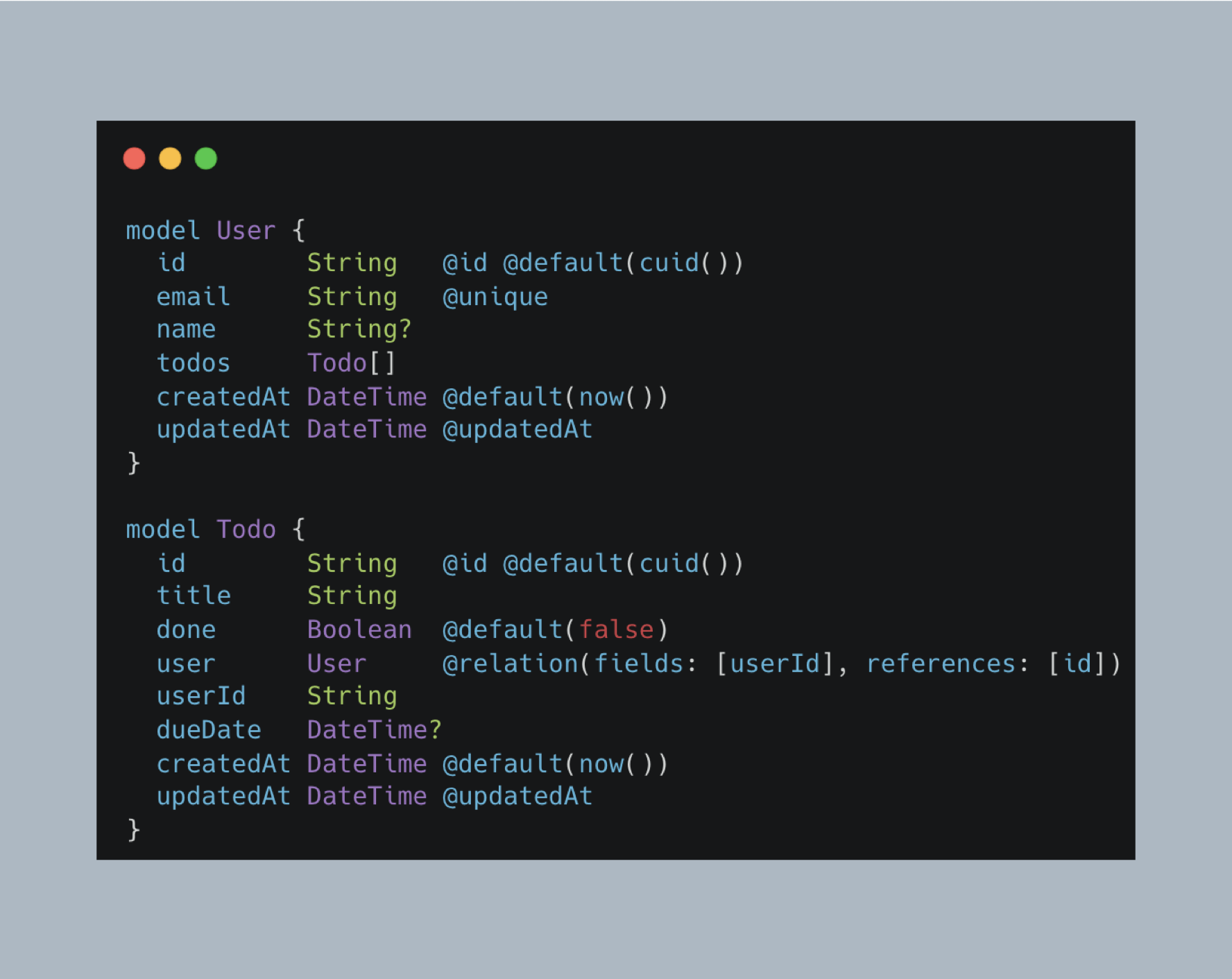
By keeping your database schema definitions in the codebase (for example, Prisma models), the AI agent gains full visibility into your domain: models, relations, and enums. This allows it to generate CRUD layers, DTOs, and validation logic automatically, while following your established patterns and rules.
Give Your AI Full Context of your run environment
Including CI/CD YAML files, Dockerfiles, and a README.md gives the AI agent a clear picture of your project flow from build, to test, to deployment. With this context, the agent not only generates code that fits seamlessly into your pipeline but also understands how to run builds, tests, lint, and other essential tasks.
Small, Single-Responsibility Prompts
In AI-Assisted Coding, you shouldn’t expect to finish an entire feature or story with a single PR or a single prompt. The scope of each change needs to be small, predictable, and easy to review.
This is why architecture matters. A decoupled design allows you to split a story into multiple independent tasks that an agent can handle in parallel. For example:
- A data service and its API contract should be separated from the UI layer.
- UI elements and Smart components should be decoupled from whole pages and routing.
- Each piece should live in small, single-responsibility files, so the agent can analyze and extend them without unintended side effects.
At the same time, files that do have tight coupling and strong cohesion should be placed close together inside strictly enclosed bounded contexts. Then, you can limit the AI prompt to just that context. This speeds up the agent’s reasoning, improves accuracy, and prevents it from wandering across the entire repo. Instead of trying to “understand everything,” the AI focuses on a well-defined part of the system.
Explicit File and Class Naming
AI agents learn and reason best when your codebase has descriptive, structured naming conventions. Every file and class should clearly communicate its type, domain, and action. This not only helps agents recognize and follow patterns, but also makes navigation faster and prompts clearer.
For example, instead of vague names like product.ts, use explicit names that encode their role and domain:
Contracts (API layer / DTOs)
- contract-product-read-many.ts
- contract-product-read-one.ts
- contract-product-delete-one.ts
- contract-product-create-one.ts
- contract-product-quick-search-many.ts
UI Components
- ui-product-list-item.component.ts
- ui-product-card.component.ts
- ui-input.component.ts
- ui-input-search.component.ts
- ui-input-autocomplete.component.ts
- ui-input-upload.component.ts
Features (business logic, feature state)
- feature-product-list.ts
- feature-product-details.ts
- feature-product-delete.ts
- feature-product-create.ts
- feature-product-add-to-cart.ts
- feature-product-quick-search.ts
Pages (composed UI)
- page-product-list.component.ts
- page-product-details.component.ts
- page-product-form.component.ts
Domain-Specific Components
- product-quick-search.component.ts
By following this structure, your agent will quickly align with your mental model. When you ask to “create a product quick search contract” the AI can instantly infer the right patterns, scope and naming conventions, reducing surprises and ensuring the output matches your architecture.
Agents Understand Events Better Than State
- UserLoggedInEvent is more than just a flag indicating that a user exists. It tells us a login happened, which provides a clear context for action.
- The agent understands why something happened, not just what changed.
- Events form a narrative of what has occurred, making the flow of the system easier to reason about and code against.
// State-driven: only checks "what is true"
if (user) {
  this.showWelcomeToast(user.name);
}
// Event-driven: reacts to "why it happened"
this.messageBus.subscribe(UserLoggedInEvent, (event) => {
  this.showWelcomeToast(event.username);
});
Behavior-Driven Tests: Teaching AI Through Stories
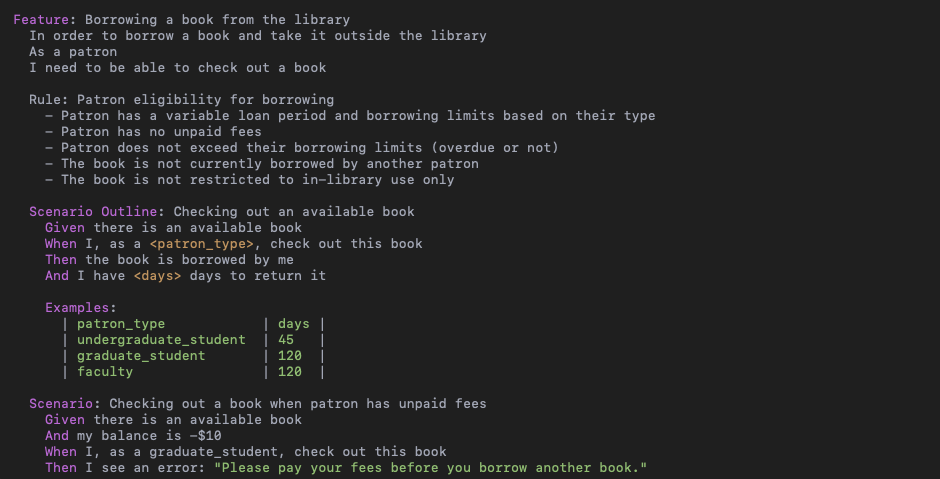
Behavior-driven tests (written in Gherkin) don’t just validate code. They give an AI agent the context of why something should work. Instead of only checking if code runs, BDD describes user goals, flows, edge cases, and outcomes in plain language. This allows the agent to reason about intent, handle exceptions, and generate solutions that match real-world scenarios, not just “working” functions. Try embedding BDD tests directly into your repository. You’ll quickly see the benefits, both in how the agent reasons about your system and in how much easier it becomes to review and trust its output.
UI Is the Costliest Thing to Refactor. Delay It, Let Agents Build the Bones First
Start with a minimal UI. Focus on the core structure and functionality rather than styling or boilerplate. This approach reduces time wasted on irrelevant details, makes the system easier to test and reason about, and allows incremental extensions as the feature evolves.
Guiding Your Agent
Different AI agents understand instructions in slightly different ways. For example, GPT-Codex uses agents.md files, while other agents might rely on different filenames or formats. The core idea is the same: use natural language to guide the agent’s behavior within a specific context.
An agents.md file is typically placed near the source code and localizes instructions per feature, folder, or domain. It allows you to outline rules, naming conventions, class structures, and define how confident the agent must be before generating code. For example:
# agents.md
- Only generate code if you're at least 90% sure about the intent.
- If unsure, do NOT guess. Summarize your plan and ask for confirmation.
Example:
I plan to create:
- contract-todo-create-one.ts
- contract-todo-read-many.ts
Placed under: contracts/todo/
You can also define global rules only for contract classes:
# agents.md - Contract Rules (Global for /contracts)
## File Naming Convention
- Use the format: Contract<Domain><Action>
- Examples: ContractProductReadMany, ContractUserCreateOne, ContractOrderDeleteOne
- Suffixes must clearly reflect the operation: ReadOne, ReadMany, CreateOne, UpdateOne, DeleteOne
- Class name and file name must match exactly
## Class Structure
Each contract should:
- Extend the base generic Contract<ReqBody, Query, PathParams, Header, Response, Extra>
- Be a standalone class
- Export necessary request/response types next to the class
- Include a static `url` and define the HTTP method inside the constructor
export class ContractDomainAction extends Contract<...> {
  static readonly url = '/some-url';
  constructor(...) {
    super(ContractDomainAction.url, 'METHOD');
  }
}
My Thoughts on AI Agents and the Future of Agent Workflows
I found the most effective workflow when using GPT-Codex in the browser. I could give the agent multiple parallel prompts while continuing to work in my IDE without waiting for the agent to finish its work. Later, I would review the generated code, switch to the created branches, and make my own adjustments. This workflow let me stay in a flow state much longer, since I was always doing meaningful work and pushing the project forward, without waiting and doing repetitive, boring tasks.
At the same time, it’s worth mentioning the risks. Not every company will agree to using AI agents that process production code on external servers. This raises serious questions of intellectual property and data ownership.
It’s also worth noting that there are new threats we should be aware of.
- Prompt injection attacks can trick an agent into doing things you never intended.
- An agent running locally could potentially execute unwanted operations on your machine if it isn’t properly sandboxed.
As you may have guessed there’s still plenty of room to improve these workflows. A good analogy is the sewing machine: when it was first imagined, people pictured robotic hands holding tiny needles, copying humans. We all know what sewing machines actually look like today, and that they don’t resemble that original idea at all.
Today, we’re still trying to bolt AI onto hand-written codebases. But the real question is: will we eventually engineer environments specifically for agents? If so, those agent-native environments might look very different from ours, and perhaps our role will be simply to operate them, not interact with them directly.
What do you think: are we heading toward agent-native environments, or will AI always just be an add-on to our current tools? Share your thoughts in the comments!