
Have you ever scrolled through a long list on a website, like a bunch of products? You find something interesting, click on it to learn more, then decide you want to go back to the list. A neat feature some websites have is remembering where you were on the list, so you can pick up right where you left off!
The Demo App
Let's take a look at a simple example to show why this is important. Imagine a small app like the one below:
Note that it has more than 9 products. A user can scroll and see more of them
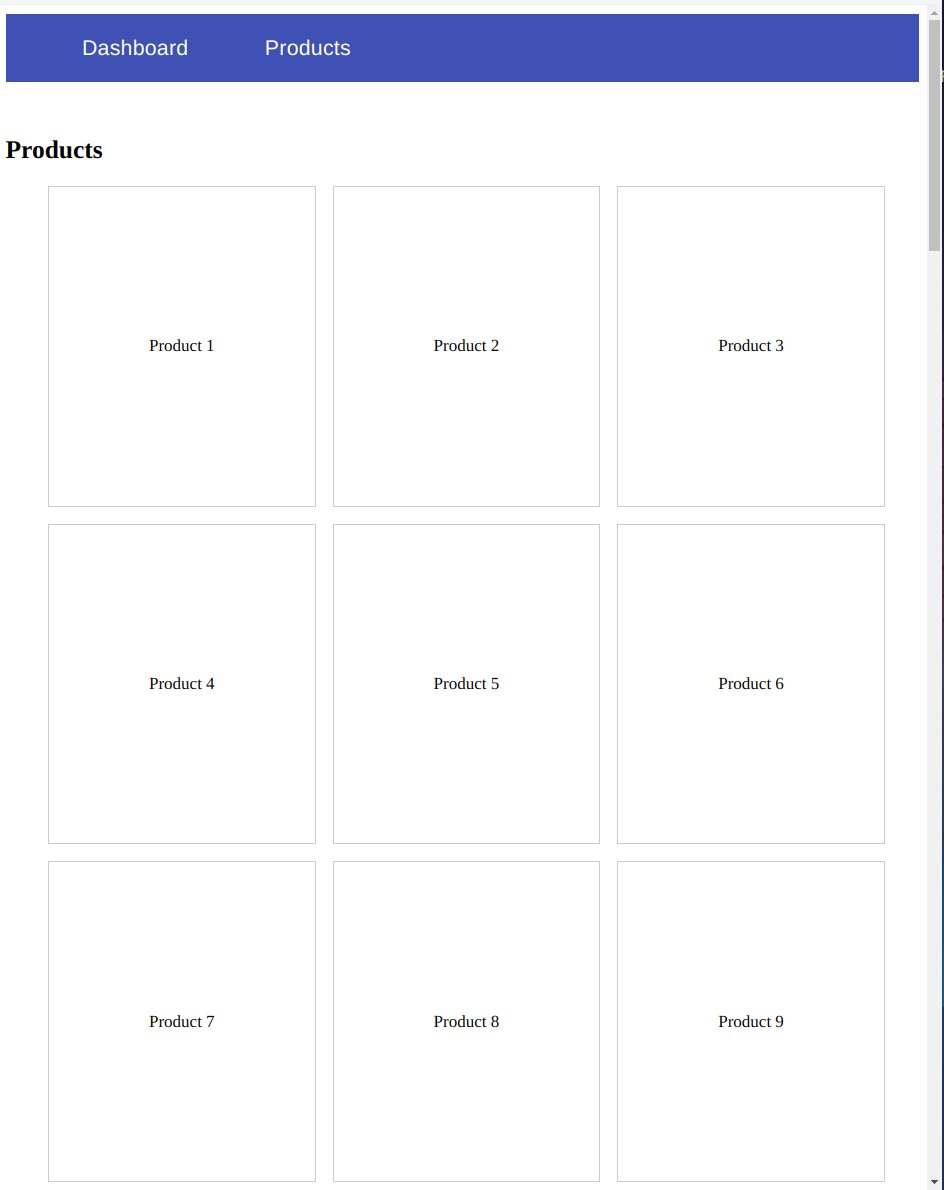
In a real-life scenario, we would have a service with an HTTP call to an endpoint that would return a list of products. In our case, we will create a service with some mock data.
products.service.ts
@Injectable({
  providedIn: 'root',
})
export class ProductsService {
  get() {
    const products = [...new Array(50)].map((it, index) => ({
      id: index + 1,
      name: `Product ${index + 1}`,
      price: 100,
      description: `This is product ${index + 1}`,
    }));
    return of(products);
  }
}
And we also need a component where we will display the products from that service.
products.component.ts
@Component({
  selector: 'app-products',
  standalone: true,
  imports: [
    NgFor, RouterLink, AsyncPipe, NgIf
  ],
  template: `
    <h2>Products</h2>
    @if (products$ | async; as products) {
      <ul class="products-container">
        @for (product of products; track product.id) {
          <li
            class="products-container--product-item"
            [routerLink]="['/products', product.id]"
          >
            <div>
              {{ product.name }}
            </div>
          </li>
        }
      </ul>
    }
  `,
  styles: [
    `
      .products-container {
        display: flex;
        gap: 16px;
        flex-wrap: wrap;

        &--product-item {
          list-style: none;
          width: 250px;
          height: 300px;
          border: 1px solid #ccc;
          display: flex;
          align-items: center;
          justify-content: center;
          cursor: pointer;
        }
      }
    `,
  ],
})
export class ProductsComponent {
  products$ = inject(ProductsService).get();
}
The Problem
If you run this application and click a product, you will navigate to a details page (products/:id). When you click the back button, restoring to the previous scrolling position would be great.
To achieve this we will enable the withInMemoryScrolling, a routing feature that has an embedded functionality to restore the scrolling position.
export const appConfig: ApplicationConfig = {
  providers: [
    provideRouter(
      routes,
      withInMemoryScrolling({
        scrollPositionRestoration: 'enabled',
      }),
    ),
  ],
};
By enabling this, if you now go to a product details page and then go back, the scrolling position will be restored!
That’s great! So, are we done? Well, kinda. There is an issue that we have to solve.
If you look closer at the products.services.ts you will see that we are returning the products without any delay. This is not, though, a real-life scenario, right? Let’s simulate a network latency to our service by using the delay rxjs operator.
@Injectable({
  providedIn: 'root',
})
export class ProductsService {
  get() {
    const products = [...new Array(50)].map((it, index) => ({
      id: index + 1,
      name: `Product ${index + 1}`,
      price: 100,
      description: `This is product ${index + 1}`,
    }));
    return of(products).pipe(
      delay(3000), // Simulate network latency
    );
  }
}
Having the artificial network latency in place, we will see that when we return to the list of products, our scrolling position is not getting restored. Instead, we are on the top of the page. In fact, we try to scroll to the last visited position, but the page height is not yet fully developed.
Let’s see an example with some simplified figures; Our viewport height is 800px long and the maximum scrolling position (with 50 products in our example) is 2000. We are scrolling to position 1000 and we click the desired product. When we return back we try to restore to the last visited position (1000) but since the products are not yet there, the maximum page height is equal to our viewport, which is 800. This makes it seem like scrolling isn't working because it can't reach position 1000 yet.
Approach the solution
To solve this problem, we would need to keep the last scrolling position state and then scroll to that position when the user returns back.
Let’s see how to do this:
- To save the scrolling position, we can use the window.pageYOffset, which returns the number of pixels by which the document is currently scrolled vertically.
- To scroll to the saved position, we can use the method window.scrollTo(x, y), which scrolls the provided coordinates.
If we utilize these two efficiently, we will have a solution to our problem. However, it’s not that straightforward to keep the last scrolling position. At least, if we want to have a solution that's scalable and re-usable at any list. So, we need to find a way to keep the last scrolling position!
While I was trying to solve this, my CTO Ryan Hutchison put me on the right track by mentioning that the scrolling position is an embedded routing event. Wait, what? Yes, that’s right!
In fact, the scrolling position event is recorded when we enable the feature withInMemoryScrolling.
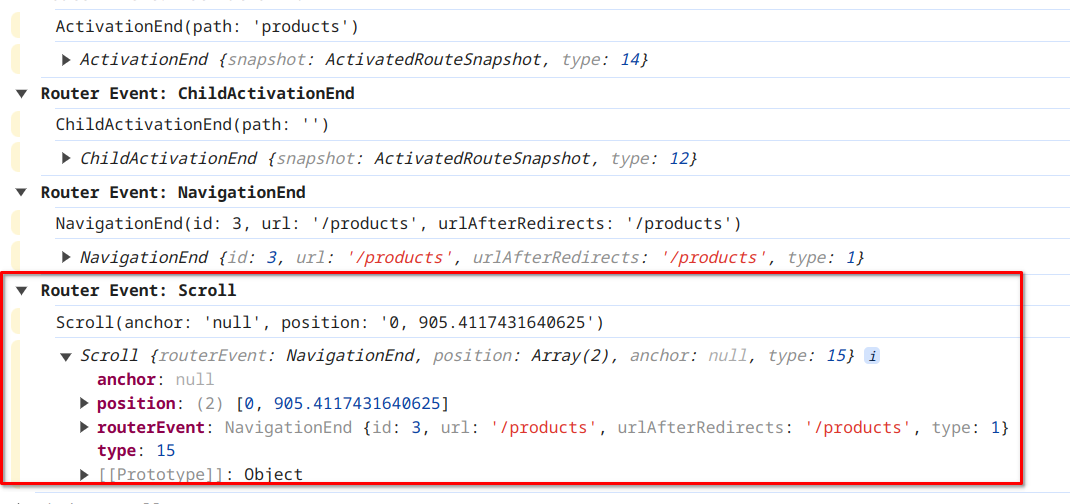
Take a closer look, and you’ll find a property called “position” that has an array of two numbers. The first item of the array represents the X axis, while the second represents the Y axis.
So, having this in mind, we no longer need to store the last scrolling position. All we have to do is to listen to the Scroll event and window.scroll(x,y).
The solution
Let’s start by creating a stream that “listens” to the scroll event:
inject(Router).events.pipe(
      filter((event): event is Scroll => event instanceof Scroll),
);
This event comes with different properties: anchor, position, routerEvent, type. We need only the position which is a tuple of [x,y] screen points.
inject(Router).events.pipe(
      filter((event): event is Scroll => event instanceof Scroll),
      map((event: Scroll) => event.position),
 )
We now need to scroll to this position. At the beginning of this article, we said that we’ll use the window.scrollTo method. Well, we’ll use a wrapper instead. The Angular wrapper ViewportScroller from the @angular/common package, where its underlying implementation is based on the window object. See this for reference.
this.viewportScroller.scrollToPosition([x,y]);Let’s put everything together:
constructor() {
    inject(Router)
      .events.pipe(
        filter((event): event is Scroll => event instanceof Scroll),
        map((event: Scroll) => event.position),
      )
      .subscribe((position) => {
        this.viewportScroller.scrollToPosition(position || [0, 0]);
      });
  }
This looks like the solution to our problem, but apparently this is still not working. Why? Well, we are trying to scroll to the position, at the wrong time. If you remember, our service has an artificial network latency. We need to take into consideration that we are working with an async dataset and try to scroll when our product is getting rendered to the screen. So, we need to find a way to wait until our data is properly rendered.
We can introduce a template reference variable in the HTML and use the signal queries to query that element. As soon as our query returns a value, we know that the list of products are getting rendered.
template reference variable
<ul #scrolling class="products-container">query the scrolling reference
scrollingRef = viewChild<HTMLElement>('scrolling');But wait, the signal queries return a signal type. Our code so far is an rxJS stream. Let’s refactor our code to make it compatible with the signal queries.
We will wrap the rxJS steam that returns the scrolling position in the toSignal method:
const scrollingPosition: Signal<[number, number] | undefined> = toSignal(
  inject(Router).events.pipe(
    filter((event): event is Scroll => event instanceof Scroll),
    map((event: Scroll) => event.position || [0, 0]),
  ),
);
and in an effect we will make sure that:
- our products are rendered if (this.scrollingRef()))
- the scrolling position has values if (scrollingPosition())
effect(() => {
  if (this.scrollingRef() && scrollingPosition()) {
     this.viewportScroller.scrollToPosition(scrollingPosition()!);
   }
});
And finally, let’s see what the final code looks like:
export class ProductsComponent {
  products$ = inject(ProductsService).get();
  viewportScroller = inject(ViewportScroller);
  scrollingRef = viewChild<HTMLElement>('scrolling');

  constructor() {
    const scrollingPosition: Signal<[number, number] | undefined> = toSignal(
      inject(Router).events.pipe(
        filter((event): event is Scroll => event instanceof Scroll),
        map((event: Scroll) => event.position || [0, 0]),
      ),
    );

    effect(() => {
      if (this.scrollingRef() && scrollingPosition()) {
        this.viewportScroller.scrollToPosition(scrollingPosition()!);
      }
    });
  }
}
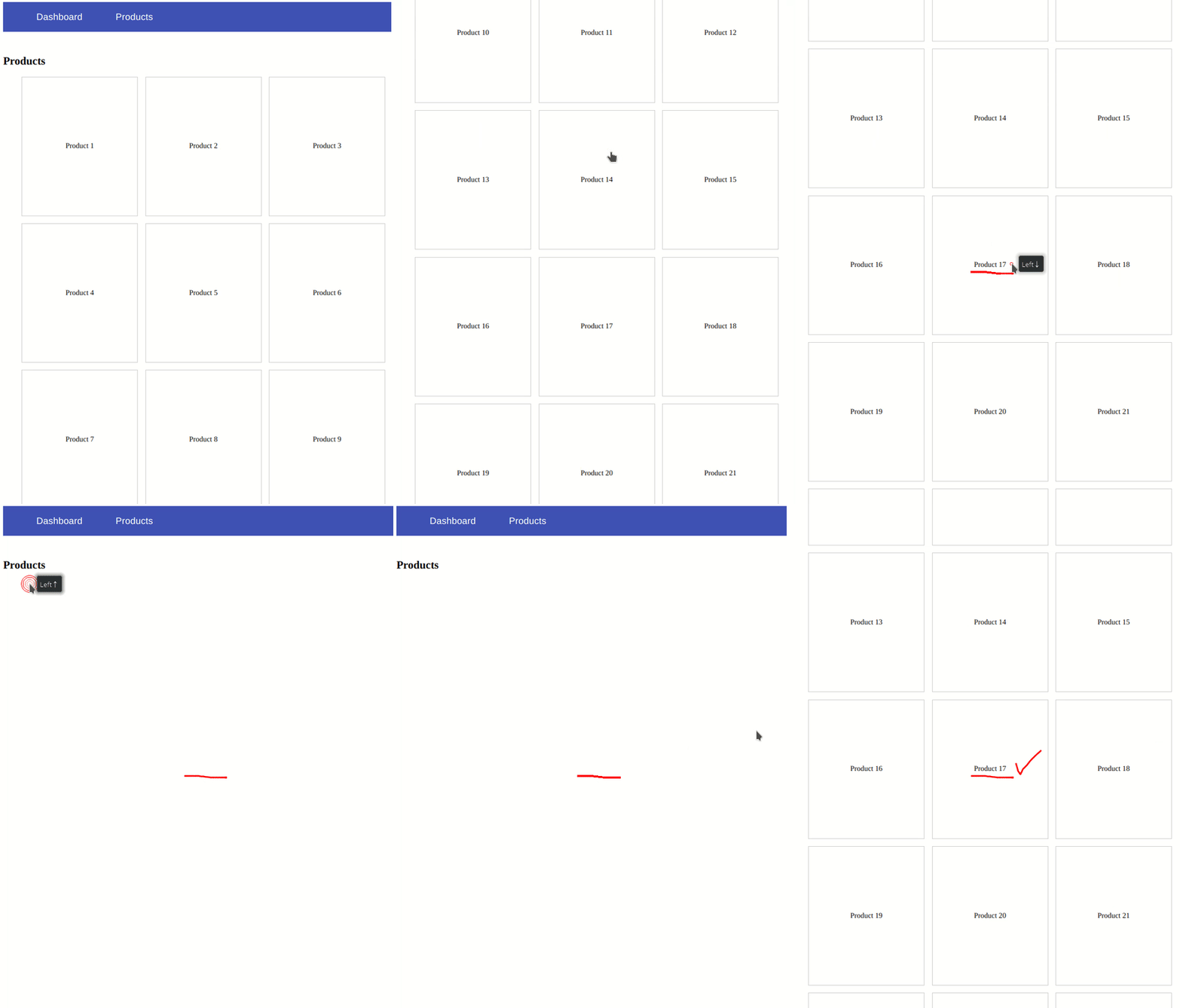
This short video illustrates how this works in the browser!
Conclusion
Restoring the scrolling position improves the User Experience.
This solution works great but it’s not that scalable. If you want to see how to make this more scalable, I highly encourage you to watch my YouTube video https://youtu.be/U7GeEkyv2Lk?si=55rivMSV43cUuvmx
Thanks for reading my article!